Every client call and every client email carries something you need to act on. A change. A question. Or the best kind of message: confirmation that the latest release is working as expected. The job is to turn each of those into a task, so the team knows what to build and the client can see where things stand.
It sounds like bookkeeping, and it is. But when it slips, the list your team works from and the list your client looks at both stop telling the truth.
This episode is a little different. The service team in it is ours.
Every request through one keyboard
For years, turning client conversations into tasks was a manual process at P2, and it was mostly one person’s job. For every email and every call, it looked like this:
- Read the client email.
- Pull out each separate request.
- Type each one in as its own task.
- After a call, do the same thing again from handwritten notes.
- Hope the small requests made in passing got written down, they usually didn’t, and never made it into the system at all.
That was the first problem. The second was that the list stopped meaning anything. Duplicates, ideas logged as work, the client’s own homework logged as our tasks. On a recent check we had 482 open tasks, spread across a 47-page printout. We stopped working from it and worked from the morning meeting instead.
The third problem we didn’t see coming. The list grew, but it never shrank, because nobody was checking tasks off as the work got done. Our backlog looked worse than it was, and our clients were looking at the same stale list in their own systems.
The problem was the process
It wasn’t the number of tasks. It was that every request had to pass through somebody’s keyboard before it counted. Anything that cost typing time got skipped, and closing finished work cost typing time too.
An inbox that proposes, and people who decide
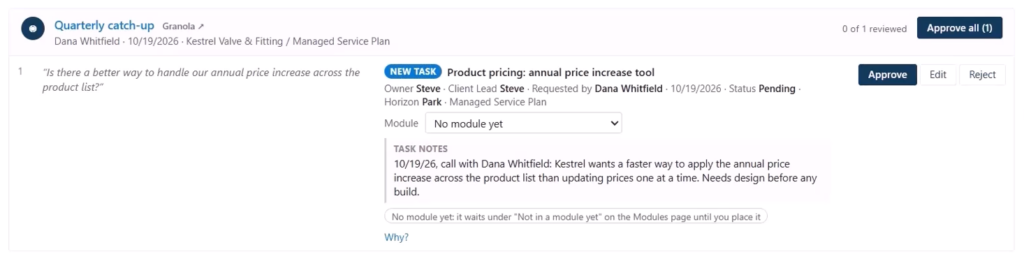
So we built a My Day dashboard for that job: a task inbox with an AI agent behind it. Every hour it reads the client emails we choose and the notes from all of our team’s calls. It doesn’t change anything in the system. Instead it proposes one card per email or call, with the client’s words on the left and the proposed change on the right.
Today a catch-up call produced one action item: a better way to manage price increases on the client’s products. The agent proposed the right owner, set the horizon to Park because it isn’t work for this week or next, and set the status to Pending. It didn’t guess at a module, because one doesn’t exist yet. That looked right, so it was approved and the task was created.
An hour-long call with another client produced seven items, and six were just FYIs, like a question about how their pricing reaches the CRM. That process is already built, so there was nothing to do: read it, dismiss it. Another item noted that email replies now show up on every linked quote. Instead of a new task, the agent found the existing one and proposed adding a note to it. That is how duplicates stop.
And the one that still surprises us: a client mentioned that a recent change was working as expected, so the agent proposed moving that task from Released to Completed, taking it off everyone’s list.

What Changed?
We read the inbox at the start and end of every day, and usually once or twice in between. Of the first 240 proposals, from emails and calls, we edited about four in ten before approving and rejected four. The agent finds the work; we shape it. Every open task now says when – Now, Next or Park – and the moment we approve, the team sees it, and so does the client.
This is one of several My Day dashboards we’ve built, each designed for a specific role. If your service team’s request list looks anything like ours did, we should talk.
Tell me the process your team hates most. In twenty minutes I’ll tell you whether a My Day view would fix it, and if it wouldn’t. https://go.oncehub.com/P2StrategySession