
When a customer calls a sales or service rep, the first job is simple: find them. Find the account, find the order they’re calling about, find the invoice. Then you can actually help.
It sounds like the easiest part of the call. At a manufacturer we work with, that first step was taking far too long.
Part of the reason is that customers don’t call with the information the system is looking for. They call with whatever they have in front of them: a PO number, a tracking number off a box, part of a company name, a partial phone number. Nobody reads you their customer ID.
A separate search for every question
The other part is that the answer could be in any one of several places. With a caller on the line and one clue in hand, the rep had to work through it a question at a time:
- Is the caller a customer? Search customers.
- Not there? Maybe a prospect. Search prospects.
- Still nothing? Search leads.
- Is the email address on the account or on the contact? Check both.
- Is the information on an order? Search orders.
- Or on an invoice? Search invoices.
Every one of those questions is a separate search.
And then there’s the third problem, the one that never shows up in a report. All of that searching happens while the customer is on the phone, waiting. Nobody measures that time. The customer feels every second of it.
The problem wasn’t the reps
It was a CRM that expected them to know where the answer lived before they could look for it. A search organized around the system’s records works fine when you already know which record holds the answer. The customer on the phone doesn’t know, and shouldn’t have to.
One panel, any detail
So we built a My Day dashboard for search: one panel on the left, and the results on the right. Type all or part of a company name and you get three lists at once, with customers at the top, prospect accounts in the middle and leads at the bottom. The same thing works for a customer ID, a contact name, a city, a state or a ZIP code.
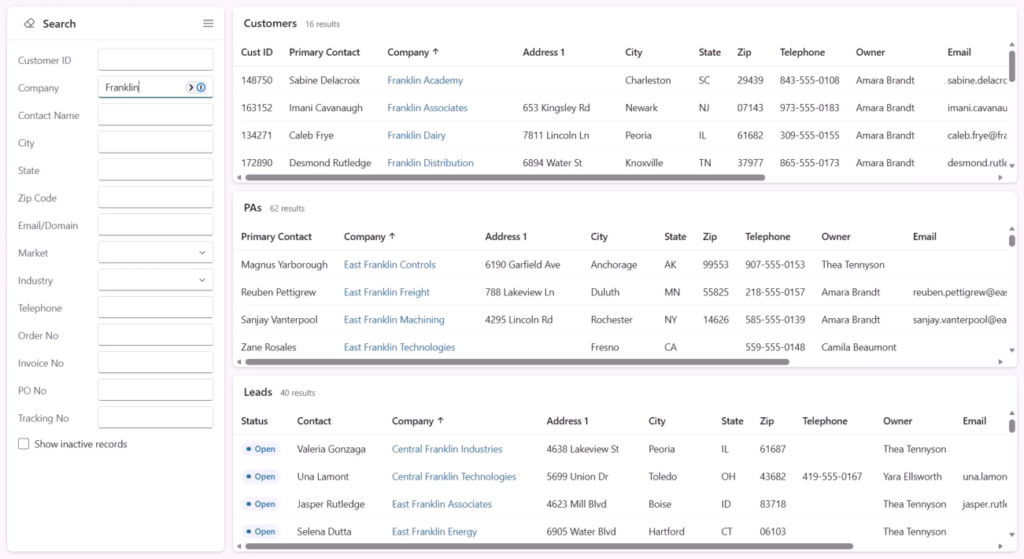
Some fields do even more. Email or domain searches every email address and every website field on accounts, contacts and leads, all at once. Telephone takes all or part of a number, so if the rep only hears the last four digits, the customer is still found in seconds. You can narrow by market and industry, too. And any list with nothing in it shrinks out of the way, so the rep only sees what matched.
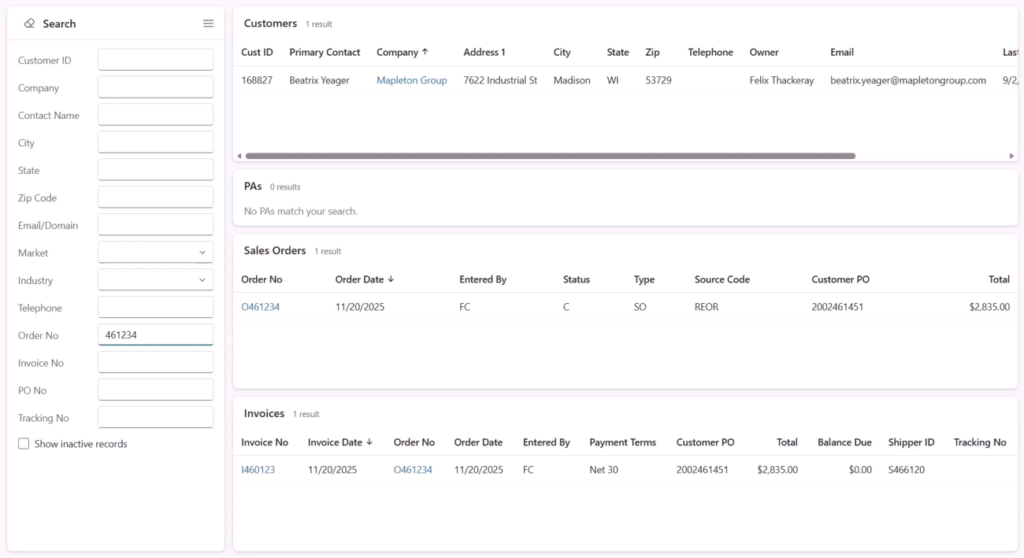
Then the part that matters most on a reorder call. When the caller gives you an order number, an invoice number, a PO or a tracking number, the leads list steps aside and sales orders and invoices take its place. The customer, the order and the invoice, together on one screen.
What Changed?
Now when a customer calls and says, “I need to reorder. My PO was this,” the rep finds the customer, the order and the invoice with one search, in less than a second. Whatever the customer gives you is enough, and nobody sits on hold while the rep hunts through the CRM.
This is one of several My Day dashboards we’ve built, each one designed for a specific role and the work that role actually does. If your sales and service team looks anything like this, we should talk.
Tell me the process your team hates most. In twenty minutes I’ll tell you whether a My Day view would fix it, and if it wouldn’t. https://go.oncehub.com/P2StrategySession