Following up on quotes is part of every salesperson’s day. The big ones get a phone call, and they should. Ten minutes on the phone about a $50,000 quote is time well spent.
But a lot of quotes aren’t big. At a manufacturer we work with, many are small-ticket items, a few thousand dollars each. We had already built their inside sales team a follow-up screen, every open quote sorted by who had been left alone longest, and it was built around the phone call. As we talked it through with the team, it became clear to everybody that not every follow-up warrants a phone call.
So the small ones got skipped. A rep can justify ten minutes on a $50,000 quote. On a $2,000 quote, they skip it. And tomorrow they skip it again.
Email Should Have Been the Answer
Email is the obvious alternative. One message, several quotes, no phone tag. Except that doing it by hand is its own project:
- Open the contact.
- Find every open quote.
- Copy the quote numbers and the amounts into an email.
- Add them up.
- Attach the PDFs.
- Work out who else at the company should be copied.
- Send it.
- Go back and log the follow-up on every quote, one at a time.
Eight steps to ask a customer about quotes that don’t feel worth asking about. Of course they waited.
And here is the part nobody adds up: small quotes aren’t small once you add them together. Nobody chases a $3,000 quote. But a dozen of them at one customer is $36,000 that nobody has asked about.
The Problem Wasn’t the Sales Team
It wasn’t a sales team ignoring small quotes. It was a system that only made one kind of follow-up easy, the phone call.
One Email, Every Open Quote
So we added an email routine to the same My Day follow-up dashboard. The difference is that one email asks for an update on several quotes at once. Next to each contact there is now an Email button.
Click it, and an email builder opens: To, CC and subject at the top, then a greeting, a short intro, a list of the quotes with their amounts and a total, and a closing. Click a quote in or out, and the email rewrites itself as you go. Attach copies of the quotes, or don’t. For two or three, maybe you do. For a dozen, maybe you don’t. It’s the rep’s call.
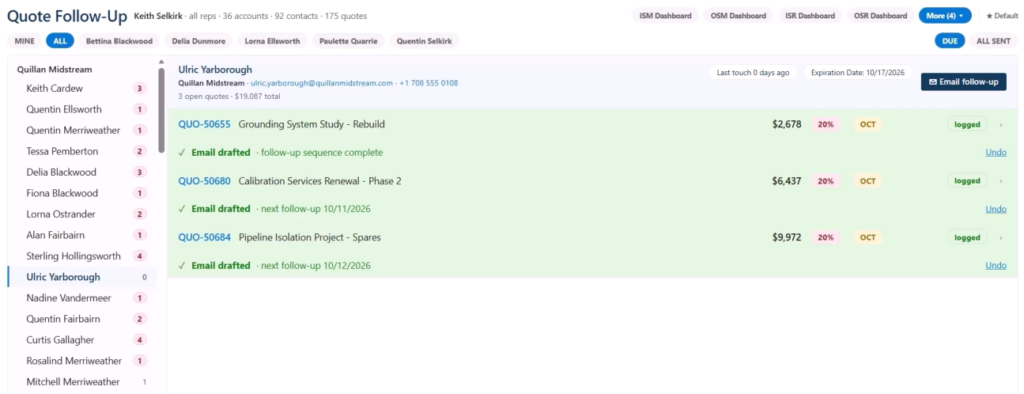
Every other active contact at that company is listed too. Click one, and they’re on the CC line. Take them off from the list or from the CC line itself. Then click Create Draft, and a standard CRM email appears, already written from everything on the builder.
Send it, and the rep is right back on the follow-up screen with every one of those quotes marked as followed up. There’s no note to type, because the email is the activity. And since this client also runs our activity center, the email appears on the timeline of every one of those quotes, not just the contact. Try that with a standard CRM setup.

What Changed?
Small quotes get a follow-up now, not a skip. One email covers several quotes, with a total the customer can see. It goes out from the rep’s own Outlook mailbox, so it reads like a person wrote it and replies come straight back, and the CRM knows it happened the moment it’s sent. The big quotes still get their phone call. Everything else finally gets asked about.
This is part two of a story that started with a call list. If you missed it, part one shows the original follow-up screen: https://www.p2automation.com/insights/why-sales-quotes-go-cold
This is one of several My Day dashboards we’ve built, each one designed for a specific role and the process that role actually runs. If your sales team looks anything like this, we should talk.
Tell me the process your team hates most. In twenty minutes I’ll tell you whether a My Day view would fix it and if it wouldn’t. https://go.oncehub.com/P2StrategySession