A printing company asked us to automate three renewal emails. We built them something better: a My Day dashboard that does everything except press Send.
The Job
One of our clients is a printing company. Most of what they make is custom work, but one product is sold on subscription, usually a year, sometimes two or three. And with a few hundred customers on it, renewals come up every week of the year. They asked us for something that sounded simple: a reminder thirty days before a subscription expires, another at seven days, and a third seven days after if it lapsed.
Why “Just Automate It” Fails Once a Year?
The obvious answer is three emails on a timer. Set it up, walk away. Here is why we didn’t.
For any one customer, a year between renewals is a long time, and three things move in that year.
- The people change. Renewal notices go to people, not companies. The person who handled last year’s renewal may have left, and there may now be two or three people who need to hear about it.
- The offer changes. Pricing, terms, the products themselves. An email written twelve months ago is quietly selling last year’s product at last year’s price.
- A fully automated reminder fails silently. It goes out to a blank greeting, or to an inbox that no longer exists, or to nobody at all because no one was flagged to receive it. And with a renewal, nobody finds out until the subscription has already expired.
The third one is the problem management doesn’t usually see. The first two are annoying. The third loses the customer.
Semi-Automatic Automation
The problem wasn’t that renewals needed automating. It’s that a year is too long between touches for anything to run itself.
What a process like this needs is what we call semi-automatic automation: the system does everything it can – the tracking, the timing, the personalization, the checks – and a person stays in the loop for the one thing that shouldn’t happen unattended, which is sending the email. It is not a compromise between manual and automated. It is the version that actually works for anything a customer only hears about once a year.
The My Day View for Renewals
So we built a My Day dashboard for subscription renewals, and made it the home for the whole process.
On the left is every active subscription customer, with its term and expiration date. On the right are three lists: expiring in thirty days, expiring in seven, and expired.

Notices go to people, so each contact on an account has a toggle, and more than one can receive them. The emails are personal in the real sense. Every contact has a “Dear” field, which the system fills from the first name if it is blank. And the email goes out from the sender’s own Outlook mailbox, not a marketing engine. It reads like they wrote it, and every reply comes straight back to them.
Then the system checks its own work. A blank “Dear” blocks that contact. A missing email address is flagged, with one click to fill it in. If no contact on the account is flagged to receive reminders, the whole company is blocked until you pick one or create one.
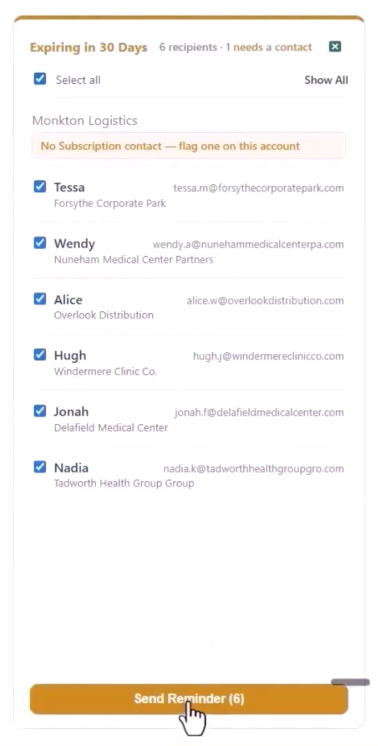
When everything checks out, sending is one motion. Select the contacts, click Send Reminder, done. They drop off the list and reappear on the seven-day list a week before expiration. The expired list works the same way, with a grace-period email.
What Changed?
Three reminders per customer, on time, to the right people, by name, from a real person, every week of the year. Because they come from someone the customer actually buys from, they get past the filters a marketing email doesn’t, and this client has seen more people write back.
And when something is wrong – a missing contact, a blank greeting, a dead address – the system says so before the email goes out, not after the subscription has lapsed.
This is one of several My Day dashboards we build, each for a specific role. If your renewals look anything like this, let’s talk about what a My Day dashboard could do for your team.
Tell me the process your team hates most. In twenty minutes I’ll tell you whether a My Day view would fix it, roughly what it would take, and if it wouldn’t. Book twenty minutes: https://go.oncehub.com/P2StrategySession